


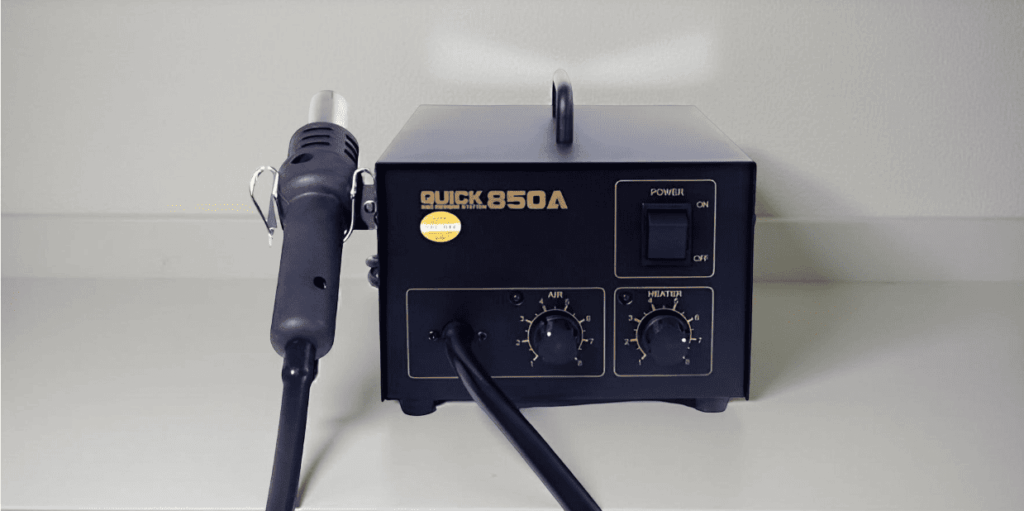
Airflow Adjustment is an important feature to consider when choosing a hot air rework station for mobile phone and electronics repair. Along with temperature control, airflow determines how heat is delivered to a component during soldering, desoldering, and SMD rework.
For technicians working on smartphone motherboards, ICs, connectors, and other small electronic components, controlled airflow can make repair work more precise and manageable.
A hot air station with suitable Airflow Adjustment allows technicians to control the amount of air directed toward the working area. This can help reduce unnecessary heat movement and provide better control during delicate repair tasks.
Table of Contents
- What Is Airflow Adjustment?
- Why Airflow Adjustment Matters in Mobile Repair
- 1. Check the Airflow Control Range
- 2. Match Airflow to the Repair Task
- 3. Consider Small Components
- 4. Check Temperature and Airflow Together
- 5. Look at Nozzle Compatibility
- 6. Consider Ease of Adjustment
- 7. Choose Suitable Equipment
- Common Airflow Mistakes to Avoid
- How to Use Airflow Effectively
What Is Airflow Adjustment?
Airflow Adjustment refers to the ability to control the amount or speed of air produced by a hot air rework station.
A hot air rework station uses heated air to transfer heat to the repair area. The technician can normally adjust both temperature and airflow according to the equipment design.
Airflow is generally controlled through a dial, buttons, digital controls, or another adjustment mechanism.
The purpose is not simply to produce more air. It is to provide an appropriate amount of airflow for the component and repair operation.
Why Airflow Adjustment Matters in Mobile Repair
Mobile phone motherboards contain many small components positioned close together.
During SMD rework, uncontrolled airflow can move small components or distribute heat beyond the intended area.
Suitable Airflow Adjustment can help technicians control the working area and adapt the hot air output to different repair tasks.
It can be particularly useful when:
- Removing SMD components
- Reworking solder joints
- Working around small ICs
- Heating solder during component removal
- Performing motherboard-level repairs
- Working with different nozzle sizes
Temperature and airflow should be selected according to the equipment manufacturer’s instructions and the specific repair application.
1. Check the Airflow Control Range
The first thing to check when evaluating Airflow Adjustment is the available airflow range.
Different hot air rework stations provide different airflow capabilities.
Before purchasing, check the manufacturer’s specifications and determine whether the available airflow settings are suitable for your typical repair work.
Consider:
- Minimum airflow
- Maximum airflow
- Adjustment method
- Airflow stability
- Digital or analog control
- Response to adjustment
A wider adjustment range can provide more flexibility, but the most important factor is whether the station offers useful control for your particular work.
2. Match Airflow to the Repair Task
Different repair jobs may require different airflow settings.
For delicate components, excessive airflow can potentially move nearby components or spread heat across a larger area.
For larger components or applications requiring more heat transfer, a different airflow setting may be appropriate.
For this reason, Airflow Adjustment should be treated as a task-specific control rather than a setting that remains unchanged for every repair.
Before starting a repair, consider:
- Component size
- Component location
- PCB design
- Nozzle size
- Required temperature
- Type of solder or rework
- Nearby sensitive components
Using controlled settings can make the rework process more predictable.
3. Consider Small Components
Modern smartphone motherboards can contain extremely small surface-mounted components.
Working around these components requires careful control of both heat and airflow.
Too much airflow can potentially disturb small components, especially when they are loose or being reworked.
A hot air station with precise Airflow Adjustment can give technicians greater control when working around densely populated PCB areas.
When performing precision work, start with suitable conservative settings and adjust according to the component and manufacturer’s recommended procedures.
4. Check Temperature and Airflow Together
Airflow should not be considered separately from temperature.
Both controls work together to determine how heat reaches the component.
For example, increasing temperature while also using very high airflow can distribute heat over a larger area. On the other hand, insufficient airflow may not deliver heat effectively to the intended working area.
When selecting a hot air rework station, look for independent controls for:
- Temperature
- Airflow
- Heating output
- Operating modes
Good control over both temperature and airflow can make SMD rework easier to manage.
5. Look at Nozzle Compatibility
Nozzles play an important role in directing hot air toward the repair area.
Different nozzle shapes and sizes can concentrate or distribute airflow differently.
Before buying a hot air rework station, check whether it supports the nozzle sizes required for your work.
Useful considerations include:
- Nozzle availability
- Nozzle size range
- Ease of replacement
- Compatibility
- Availability of spare nozzles
The combination of Airflow Adjustment and suitable nozzle selection can help technicians direct heat more effectively.
If you regularly work on different smartphone motherboard layouts, having compatible nozzle options can be useful.
6. Consider Ease of Adjustment
A technically capable hot air station should also be convenient to operate.
During repair work, technicians may need to change temperature and airflow while observing the component under magnification.
Controls should therefore be easy to reach and understand.
When comparing equipment, consider:
- Control placement
- Digital display readability
- Dial or button operation
- Adjustment precision
- Preset settings
- Memory functions, if available
Easy Airflow Adjustment can help technicians make quick changes without unnecessarily interrupting their workflow.
7. Choose Suitable Equipment
The final consideration is choosing equipment that matches your repair requirements.
A beginner working on basic repairs may not need the same hot air station as a technician performing professional motherboard and chip-level repair.
When comparing hot air rework stations, consider:
- Airflow control
- Temperature range
- Power rating
- Heating performance
- Nozzle compatibility
- Display and controls
- Spare-part availability
- Manufacturer support
You can explore hot air rework stations and other mobile repair tools from Mtools.
Select equipment based on your actual repair applications instead of choosing solely according to the highest power or airflow specification.
Common Airflow Mistakes to Avoid
Using Maximum Airflow for Every Repair
Maximum airflow is not automatically the best setting. High airflow can disturb small components and spread heat unnecessarily.
Ignoring Nozzle Size
The nozzle influences how air and heat reach the working area. Use a nozzle appropriate for the component and repair task.
Increasing Temperature Without Adjusting Airflow
Temperature and airflow work together. Changing one may affect how heat is transferred to the component.
Working Too Close to Sensitive Components
Keep the hot air tool at an appropriate distance and follow recommended operating procedures.
Not Practicing Before Precision Repair
If you are learning mobile motherboard repair, practice on suitable training boards before working on valuable devices.
How to Use Airflow Effectively
A controlled approach can help improve hot air rework.
Step 1: Identify the Component
Determine what component needs to be removed, soldered, or reworked.
Step 2: Select a Suitable Nozzle
Choose a nozzle appropriate for the size and location of the component.
Step 3: Set the Temperature
Use an appropriate temperature according to the equipment, component, solder, and repair procedure.
Step 4: Adjust the Airflow
Set the airflow according to the component and application rather than automatically using the maximum setting.
Step 5: Monitor the Component
Observe the solder and surrounding components carefully while applying heat.
Step 6: Adjust Carefully
If the heating process is not producing the desired result, make controlled adjustments rather than making large changes immediately.
Airflow Adjustment and Professional Mobile Repair
For professional mobile repair technicians, having good control over a hot air station can become an important part of the workstation.
A typical motherboard repair workstation may also include:
- Microscope
- Soldering station
- DC power supply
- Multimeter
- ESD mat
- ESD-safe brushes
- Precision tweezers
- PCB cleaning tools
These tools work together to support testing, inspection, component replacement, and board-level repair.
A suitable hot air rework station with reliable Airflow Adjustment can complement these tools and provide greater flexibility for SMD rework.
Final Thoughts
Airflow Adjustment is an important feature when choosing and using a hot air rework station for mobile phone repair.
The ability to control airflow can help technicians adapt their equipment to different components and repair tasks. However, airflow should always be considered together with temperature, nozzle selection, power, and the characteristics of the component being repaired.
Before purchasing a hot air rework station, check its airflow range, adjustment method, nozzle compatibility, temperature control, and overall performance.
The right equipment is not necessarily the one with the highest airflow. It is the one that provides the control and features required for your repair work.